
Request a Quotation or Consultation

Select All

No products have been added to the consultation yet.

MORE PRODUCTS

What are you looking for?

Find the services you need by searching for product names, model numbers, or solution details.

Fanless Medical Computers: Benefits of Fanless Design in Clinical Environments

test

doctors pointing at a medical computer

Computers are used throughout modern healthcare, from patient rooms and nursing stations to diagnostic equipment, operating rooms, and point-of-care systems. In these settings, however, computing performance is only one part of the design challenge.


A conventional computer often relies on cooling fans to move air through the enclosure. In a clinical environment, that airflow can also draw dust into the system, introduce operating noise, and create another mechanical component that requires maintenance.


A fanless medical computer takes a different approach. By using passive thermal management, it can operate without an internal cooling fan while supporting the hygiene, reliability, and usability requirements of healthcare applications.


This article explains how fanless medical computers work, why fanless design is widely used in clinical environments, and what medical device manufacturers and healthcare organizations should consider when choosing one.

What Is a Fanless Medical Computer?

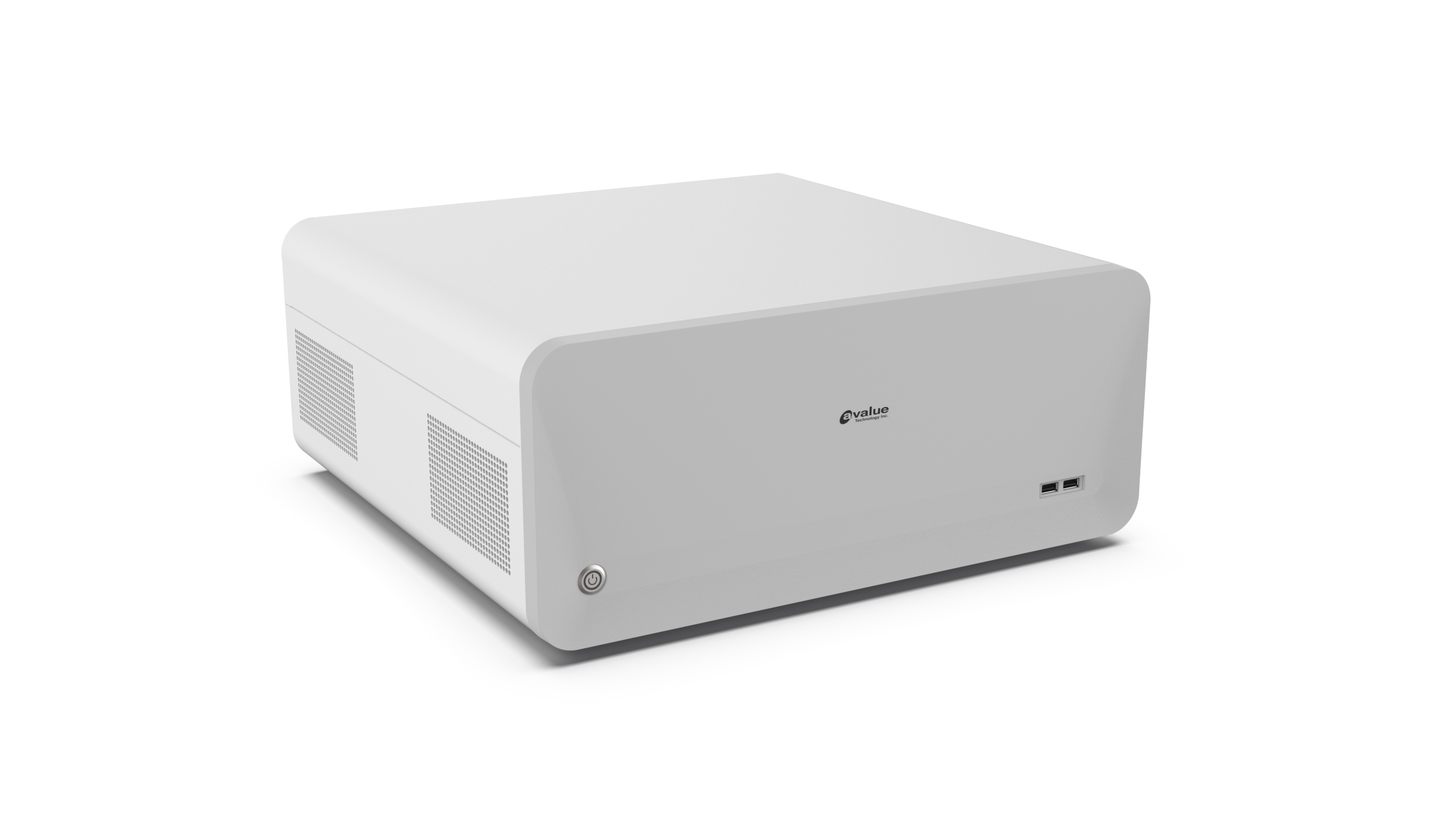
A fanless medical computer is a healthcare computing system designed to dissipate heat without relying on a mechanical cooling fan. It may take the form of a medical panel PC, embedded computer, clinical workstation, or other medical computing platform.


Instead of forcing air through the enclosure, a fanless system transfers heat away from the processor and other heat-generating components through passive thermal structures. Depending on the design, these may include heat spreaders, heat pipes, thermal pads, metal chassis components, and carefully selected low-power processors.

This approach can offer several advantages in clinical environments:

•Less airflow through the computer enclosure
•Reduced internal dust accumulation
•Quiet operation
•Fewer moving components
•Lower fan-related maintenance requirements
•Greater flexibility for sealed and easy-to-clean enclosures

Fanless design alone does not make a computer suitable for medical use. A fanless medical computer must still be evaluated according to its intended application, including electrical safety, EMC, cleaning requirements, computing performance, connectivity, and applicable medical standards.

How Fanless Medical Computers Differ from Standard Computers

Commercial and industrial computers can also use fanless cooling, but medical computers are developed around additional healthcare requirements.


For example, a medical system may need to comply with relevant medical electrical safety and EMC standards, support frequent disinfection, operate close to patients, or connect with medical equipment. The enclosure, power system, I/O design, materials, and certification strategy must therefore be considered alongside the thermal design.


This combination is what makes fanless architecture particularly valuable in healthcare: it supports a computing platform that can be quieter, easier to maintain, and better suited to controlled clinical environments.


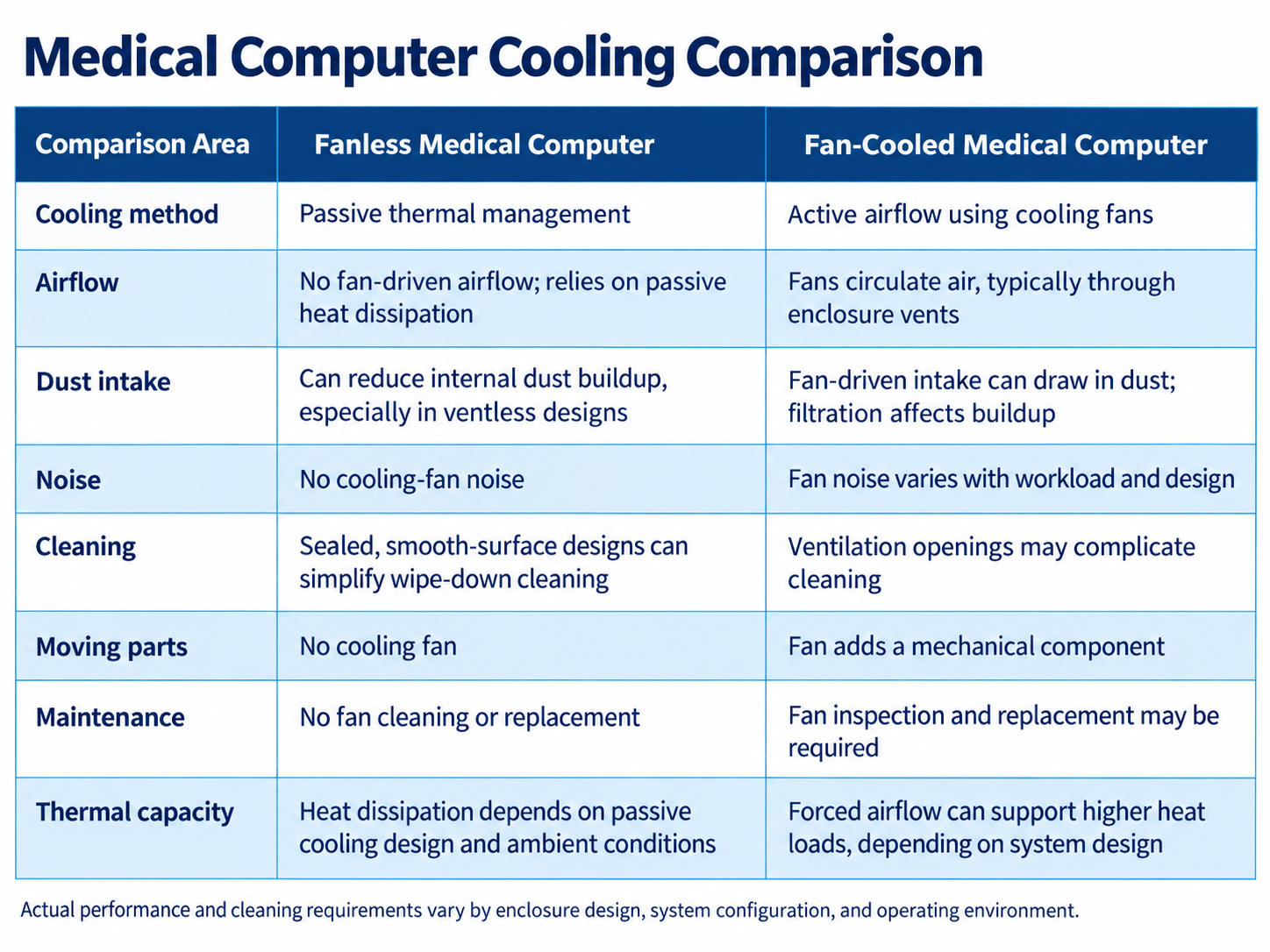
Fanless Medical Computer vs. Fan-Cooled Computer: What Are the Differences?

test

Fanless Comparison

A fan-cooled system uses active airflow to move heat away from the processor and other components. This can support high thermal loads, but it also introduces ventilation openings, moving parts, airflow, and potential dust intake.


A fanless system relies primarily on passive heat transfer. The enclosure itself may become part of the thermal solution, allowing the computer to dissipate heat without continuously pulling surrounding air through the chassis.

Neither approach is automatically better for every application. High-performance computing systems can generate significant heat, and the thermal architecture must be capable of handling the actual processor, GPU, storage, and expansion workload.

For medical applications, the key question is whether the selected fanless design can maintain reliable performance under sustained operating conditions.

What Should You Consider When Choosing a Fanless Medical Computer?

test

medical-professionals-working-in-office-setting

Choosing a fanless computer should involve more than confirming that there is no cooling fan. The complete system must match the healthcare application, regulatory environment, connected equipment, and expected operating workload.

IEC 60601-1 and IEC 60601-1-2 Compliance

Depending on the intended use, a medical computer may need to meet recognized medical electrical equipment standards.


IEC 60601-1 establishes general requirements for the basic safety and essential performance of medical electrical equipment. The current consolidated Edition 3.2 incorporates amendments published through 2020.


IEC 60601-1-2 addresses electromagnetic disturbances, including emissions and immunity requirements for medical electrical equipment and systems.


Certification requirements vary according to the intended use and complete system configuration, so buyers should verify the exact standards, edition, model, power adapter, and configuration covered by the supplier's documentation.


Thermal Performance Under Sustained Workloads

Fanless systems depend heavily on thermal architecture. A computer that performs well during short workloads must also be able to manage heat during extended clinical operation.


When evaluating a system, consider the actual workload rather than processor specifications alone. Medical imaging, AI inference, multiple high-resolution displays, and continuous data processing can generate considerably more heat than basic bedside documentation.


Processor power, ambient operating temperature, enclosure design, expansion devices, and mounting conditions can all affect thermal performance.


IP Rating, Cleaning, and Enclosure Design

Fanless architecture can make it easier to create a sealed enclosure because large ventilation openings are not required for continuous cooling airflow.


This can be particularly useful in clinical environments where equipment is cleaned frequently. The CDC recommends more frequent cleaning and disinfection of frequently touched surfaces and surfaces close to patients, while also emphasizing the importance of following manufacturer instructions for material compatibility.


Useful design characteristics may include a smooth front surface, minimal seams, sealed controls, and an appropriate ingress protection rating. However, buyers should check whether an IP rating applies only to the front panel or to the complete enclosure.


I/O Connectivity, Performance, and Expansion

A fanless medical computer still needs to support the devices and software used in the target workflow.


Depending on the application, requirements may include USB, Ethernet, serial communication, HDMI or DisplayPort, Wi-Fi, Bluetooth, or internal M.2 and PCI Express expansion.


The evaluation should therefore cover:


  • CPU, GPU, and AI computing requirements
  • Memory and storage capacity
  • Display and touch requirements
  • Medical device and peripheral interfaces
  • Network connectivity
  • Expansion for future functionality


A lower-power processor may simplify passive cooling, but it should not compromise the performance needed by the medical application.


Product Lifecycle and Long-Term Availability

Medical equipment can remain deployed for many years. Changing the computing platform may require additional compatibility testing, software validation, documentation, and potentially regulatory work.


Medical device manufacturers should therefore ask how long the platform will remain available and how the supplier manages component revisions, firmware, end-of-life notifications, and replacement products.


Why Are Fanless Computers Used in Medical Environments?

Fanless computing is particularly well suited to healthcare because it addresses several practical challenges at the same time.

Easier Cleaning and Reduced Dust Intake

Removing a cooling fan can reduce the need for large ventilation openings and continuous airflow through the enclosure.


This does not make a computer sterile or eliminate infection-control requirements. However, a more sealed system with smooth external surfaces can simplify routine cleaning and reduce internal dust accumulation.


Avalue also notes that medical panel PCs commonly use fanless designs to reduce the circulation of dust and airborne contaminants in healthcare environments.


Quiet Operation Near Patients and Clinical Staff

Hospitals contain many alarms, conversations, carts, equipment, and other sources of sound. A cooling fan adds another source of continuous background noise.


Removing the fan enables near-silent computer operation, which can be beneficial in patient rooms, examination rooms, consultation spaces, and other environments where a quieter setting supports patient comfort and staff communication.


Fewer Moving Parts and Reduced Maintenance

Cooling fans are mechanical components. Over time, dust accumulation, bearing wear, or mechanical failure can reduce their effectiveness and require cleaning or replacement.

A fanless system removes this particular maintenance point. For computers installed on carts, inside medical equipment, or in locations that are difficult to service frequently, reducing the number of moving components can simplify long-term maintenance.

The system still requires appropriate inspection and servicing, but there is no cooling fan that must be cleaned, monitored, or replaced.


Where Are Fanless Medical Computers Commonly Used?

The advantages of fanless operation are useful across several clinical settings.


  • Patient bedside and point-of-care applications: Quiet operation and easy-to-clean surfaces are useful for systems positioned close to patients, including bedside information terminals and point-of-care workstations.

  • Operating rooms and surgical environments: Fanless medical computers can support surgical imaging, equipment control, video management, and other applications where reliability, cleaning, and medical equipment integration are important.

  • Diagnostic and examination rooms: These environments may use medical computers for diagnostic software, imaging, device control, or electronic medical records while benefiting from low-noise operation.

  • Healthcare kiosks and patient-facing applications: Fanless systems can support check-in, wayfinding, patient information, and self-service applications while reducing maintenance associated with cooling fans.


Avalue's healthcare solutions span applications including bedside infotainment, patient and room information displays, telemedicine, operating-room imaging, rehabilitation, life science, and AI-ready healthcare systems.


How Avalue Supports Fanless Medical Computing for Clinical Applications

Avalue provides medical computing platforms designed for healthcare organizations, medical equipment manufacturers, and system integrators.


Its medical panel PC portfolio includes fanless platforms designed to combine computing performance with healthcare-oriented enclosure, connectivity, and certification features. For example, the HID-1540 is specified as a fanless medical panel PC with a front IP65 rating, antimicrobial finishing, a medical-grade adapter, and IEC/EN 60601-1 and IEC/EN 60601-1-2 certification.


Thermal Design and System Integration

Effective fanless computing depends on matching processor performance, enclosure design, and thermal management to the intended workload.


Avalue supports healthcare systems ranging from conventional clinical interfaces to newer AI-ready applications. Its current medical portfolio includes platforms using Intel Core processors, flexible storage and expansion options, and connectivity designed for medical peripherals and hospital networks.


For more demanding applications, Avalue has also introduced medical platforms designed for AI inference and medical imaging. The HID-2146, for example, supports Intel Core Ultra processors and expansion for graphics or AI acceleration, illustrating how medical computing platforms are evolving beyond basic clinical terminals.


Medical Safety, Hygiene, and Connectivity

Avalue medical platforms can combine fanless operation with healthcare-specific characteristics such as medical safety and EMC certification, IP-rated front panels, antimicrobial finishes, touch displays, wireless expansion, and multiple I/O interfaces.


The exact combination varies by product, so medical equipment manufacturers should select the platform according to the deployment environment rather than assuming every medical computer provides the same features or certifications.


Avalue also supports OEM and ODM customization, allowing system developers to adapt computing performance, connectivity, mechanical design, peripheral integration, and other system requirements for specific medical applications.


Fanless Medical Computer FAQs

Why are fanless computers used in medical environments?


Fanless computers can reduce airflow through the enclosure, limit internal dust accumulation, and eliminate cooling-fan noise. They can also support sealed, easy-to-clean designs and remove one mechanical component that would otherwise require maintenance.


These characteristics make fanless architecture particularly useful for patient-facing and clinical computing applications.


What are the benefits of fanless medical computers in clinical settings?


The primary benefits are improved suitability for cleaning, reduced dust intake, quiet operation, and fewer mechanical components.


However, these benefits depend on proper system design. A fanless computer must still provide adequate thermal performance, medical safety and EMC compliance where required, suitable connectivity, and enough computing performance for its intended workload.


Can fanless medical computers operate 24/7?


Yes, a properly designed fanless medical computer can support continuous operation, but fanless architecture alone does not guarantee 24/7 reliability.


Continuous use depends on factors such as thermal design, processor and component selection, ambient temperature, workload, enclosure configuration, and system validation. Buyers should confirm that the selected platform has been designed and validated for the operating conditions of the target application.


Choosing the Right Fanless Medical Computer for Clinical Use

Fanless design offers more than quiet operation. In healthcare environments, eliminating the cooling fan can reduce airflow and internal dust accumulation, simplify enclosure design for cleaning, remove a mechanical maintenance point, and improve acoustic comfort around patients and clinical staff.


The right fanless medical computer, however, must balance these advantages with sufficient thermal performance, medical safety and EMC requirements, computing capability, connectivity, and long-term product support.


For medical device manufacturers and healthcare organizations, evaluating these factors together helps ensure that the selected platform fits both the clinical environment and the technical demands of the application.


Need a fanless medical computer designed around your performance, certification, I/O, and clinical deployment requirements? Contact Avalue to discuss your healthcare application and find the right medical computing platform for your project.


Avalue Privacy Statement
INTRODUCTION

Welcome to avalue-usa.com ("we," "our," "us"). Your privacy is important to us. This Privacy Policy explains how we collect, use, disclose, and safeguard your information when you visit our website .

Privacy Policy Effective Date: Feb.13th, 2025

PAGE CONTENTS

A.Information We Collect

B.How We Use Your Information

C.Sharing Your Information

D.Cookies and Tracking Technologies

E.Data Security

F.Third-Party Links

G.Your Rights and Choices

H. Changes to This Privacy Policy

I. Contact Us

A. Information We Collect

We may collect the following types of information:
Personal Information: Name, email address, phone number, mailing address, and other contact details provided voluntarily.

Usage Data:
Information about how you interact with our website, such as IP address, browser type, pages visited, and duration of visit.

Cookies and Tracking Technologies:
We may use cookies and similar tracking technologies to enhance user experience and analyze website performance

B. How We Use Your Information

We use the collected information to:
1. Provide, operate, and maintain our website.
2. Improve user experience and website functionality.
3. Communicate with you, including responding to inquiries.
4. Analyze usage trends and monitor website performance.
5. Comply with legal obligations.

C. Sharing Your Information

We do not sell or rent your personal information. However, we may share your information with:
Service Providers: Third-party vendors that help us operate the website.
Legal Requirements: If required by law, we may disclose your information to comply with legal obligations.

D. Cookies and Tracking Technologies

We use cookies to improve website functionality and user experience. You can adjust cookie settings in your browser to disable or limit their use.

E. Data Security

We implement appropriate security measures to protect your personal information from unauthorized access, disclosure, or destruction.

F. Third-Party Links

Our website may contain links to third-party websites. We are not responsible for their privacy practices and encourage you to review their policies.

G. Your Rights and Choices

Depending on your jurisdiction, you may have rights regarding your personal data, such as access, correction, deletion, or opt-out of certain uses. Contact us to exercise these rights.

H. Changes to This Privacy Policy

We may change this Privacy Policy from time to time by posting a new version on this page. The new version will become effective on the date posted, which will be listed at the end of the page as the Last Updated.

I. Contact Us

If you have any questions about this Privacy Policy, please contact us at: support@avalue-usa.com

Subscribe Newsletter

Check the topics you're interested in, and be the first to receive the latest updates on them!

Subscribe Subject

Invalid format

Press Release

E-letter

White Paper

Enter Confirmation Code

Subscribe Successfully

Thank You for Subscribing, We look forward to staying in touch with you!

CLOSE

Unsubscribe

Check the topics you're interested in, and be the first to receive the latest updates on them!

Enter Confirmation Code

Unsubscribed

You have successfully unsubscribed from our emails. We always welcome you to resubscribe at any time.

CLOSE