Request a Quotation or Consultation

Select All

No products have been added to the consultation yet.

MORE PRODUCTS

What are you looking for?

Find the services you need by searching for product names, model numbers, or solution details.

test

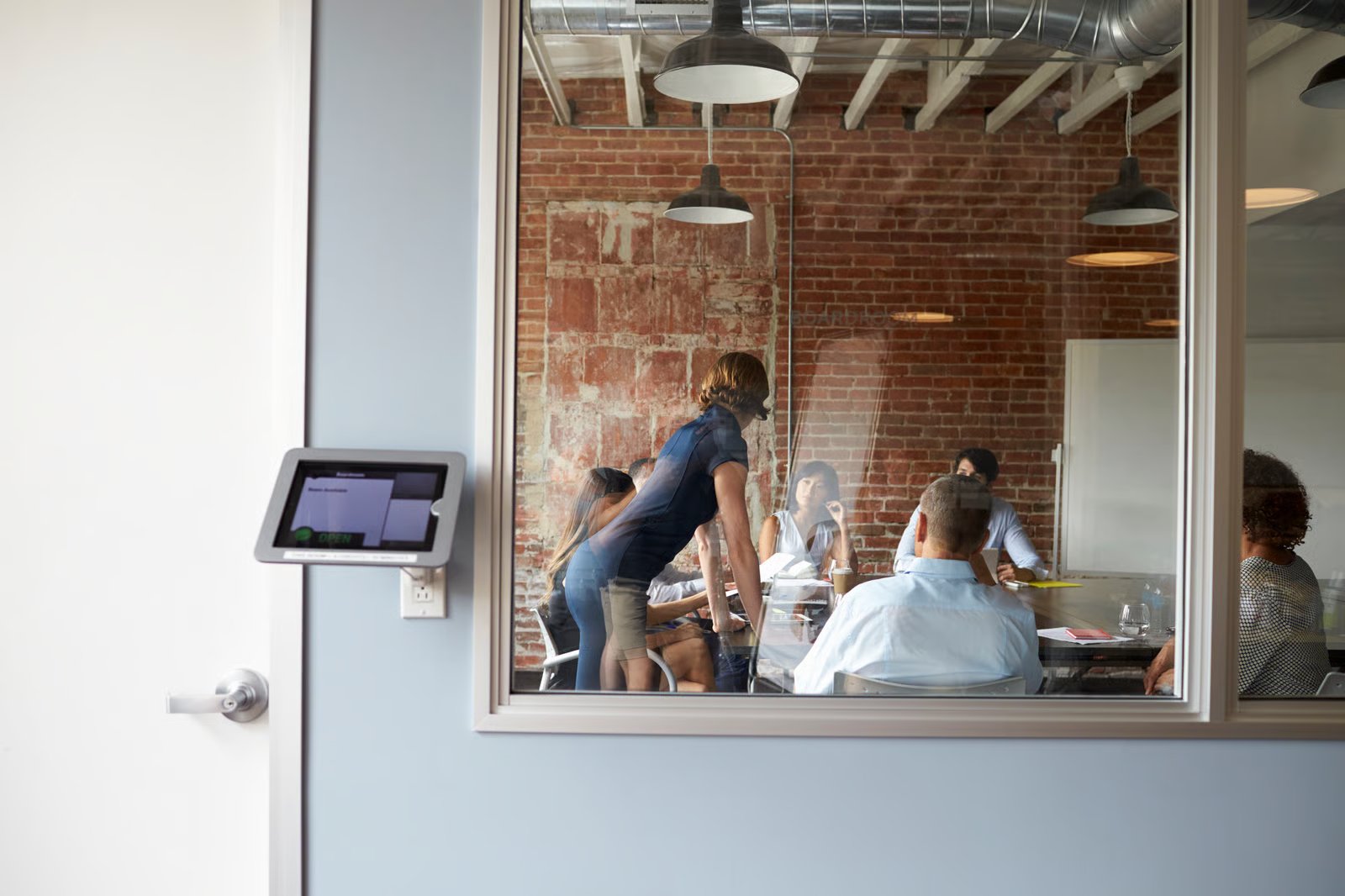
Meeting room booking panel mounted outside an office meeting room

Smart office technology connects devices, software, and building systems to help organizations manage workplace spaces, automate daily operations, and improve facility efficiency.


For facility managers, IT teams, and system integrators, the challenge is choosing the right mix of sensors, user interfaces, computing hardware, and management platforms, then making sure they work together reliably. This guide explains the devices behind smart office technology, their role in space management, and what to check when selecting hardware for long-term deployment.

What Is Smart Office Technology and How Does It Work?

Smart office technology combines connected devices, sensors, communication networks, and software to monitor workplace conditions and automate selected tasks. Common applications include meeting room booking, visitor check-in, access control, occupancy monitoring, and environmental management.


A typical system follows a simple flow: sensors or users generate information; a network carries it to local computers or a management platform; software processes it; and displays or building controls show an update or perform an action.


In a room-booking setup, scheduling software supplies reservation status to a display at the room entrance. For occupancy analysis, sensors feed presence readings to a reporting platform. A booking reflects planned use; a sensor reading reflects detected activity.


Depending on the system architecture, cloud or on-premises platforms may handle centralized management and reporting. Local computers can support on-site interfaces, device communication, and selected offline functions when properly configured. Define outage behavior and data resynchronization during design. Basic status displays and sensor forwarding generally do not require edge AI.

What Devices Are Used in a Smart Office?

Smart office devices serve different roles: interactive panels present information, sensors capture conditions, building controls carry out approved actions, and local computers connect equipment with software. The most common devices are meeting room booking panels, visitor check-in kiosks, access control terminals, occupancy and environmental sensors, embedded computers, and IoT gateways.


Meeting Room Booking Panels and Scheduling

A booking panel outside a meeting room shows current availability, upcoming reservations, and room information supplied by scheduling software. Check-in, on-the-spot booking, and reservation release are application functions, so verify them with the selected platform before specifying hardware.


The scheduling platform remains the system of record, while an industrial panel PC supplies the on-site touchscreen and computing platform. For a configurable room-booking interface, check screen legibility, touch responsiveness, mounting, power, network connectivity, operating-system support, and compatibility with the booking application.


Visitor Check-In Kiosks, Video Intercoms, and Access Control Terminals

A reception kiosk presents appointment lookup and visitor registration through its application. Host notifications need a connection to the notification service, and badge printing needs a compatible printer. For building entry, video intercoms support two-way communication, while access-control readers and controllers manage credential checks and door permissions.


For a visitor kiosk, the panel PC supplies the touchscreen and computing platform. Identity verification and door control require separately specified security software, readers, and controllers. Before choosing hardware, list the camera, audio, printer or scanner, network, and mounting requirements for the workflow.


Occupancy and Environmental Sensors

Occupancy sensors collect presence signals for rooms, desks, and shared areas. Temperature, humidity, carbon dioxide, and light sensors provide readings for facility dashboards. For automated lighting or HVAC, verify that the building controller accepts the sensor input, supports the required communication protocol, and implements the intended control rules.


Basic motion sensors, such as passive infrared (PIR) sensors, detect movement but generally cannot provide reliable people counts. Dedicated people-counting systems may use cameras, radar, or other sensing technologies, depending on accuracy and privacy requirements.


Embedded Computers and IoT Gateways

An IoT gateway exchanges data through its supported device interfaces and protocols. An embedded computer runs local applications, processes selected sensor readings, and communicates with central systems. For a multi-floor office, compare protocol support, connected-device count, workload, and fault recovery before deciding where to place each component.


For each gateway or embedded computer, document the required I/O ports, communication protocols, processing load, and functions that must remain available offline. Test reconnection, data synchronization, and recovery after network or power interruptions.


Building Controls and Facility Panels

A facility control panel presents equipment status and authorized controls, while the building automation controller executes the control logic. In an occupancy-based lighting setup, the sensor reading is only an input to a configured rule. Test timeouts, sensor faults, and manual override behavior before activating automated responses.


Smart Office Device Comparison: Which Hardware Fits Each Use Case?

test

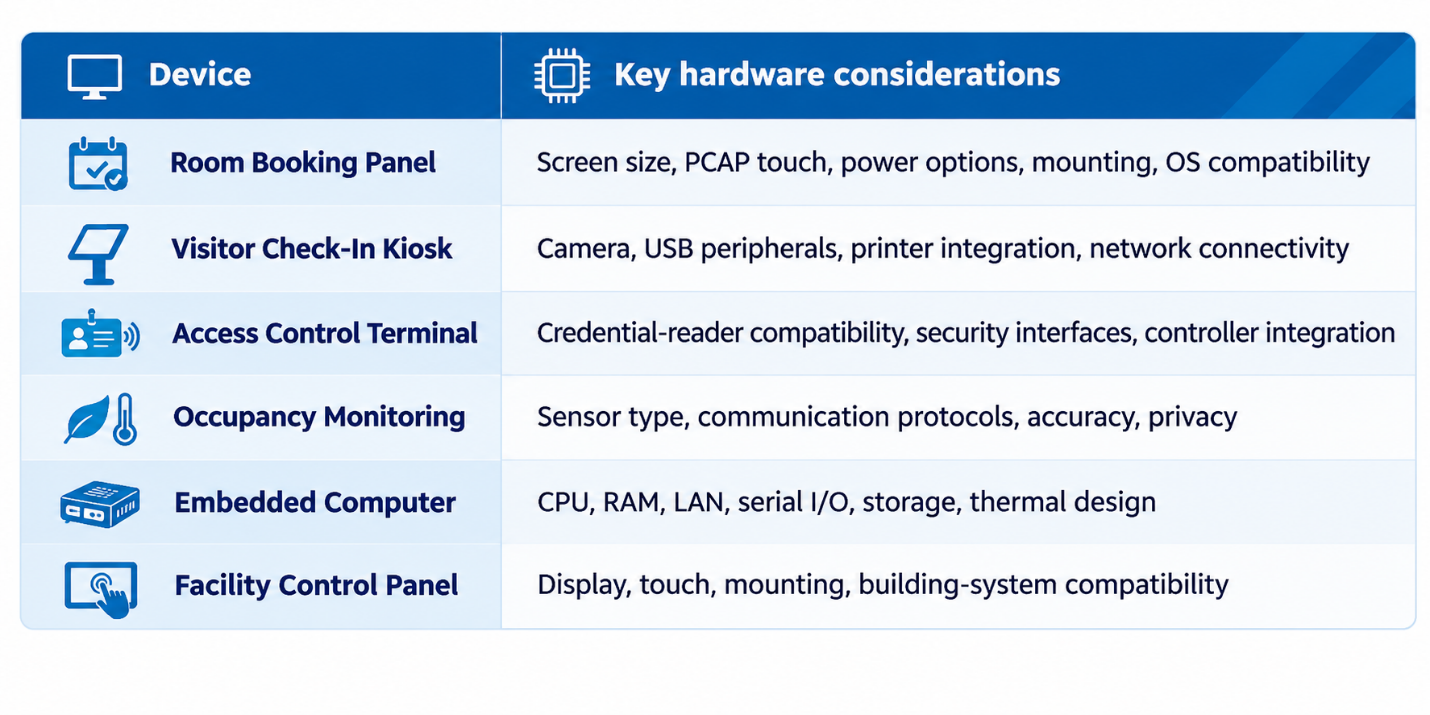
Smart office device comparison table with key hardware considerations

Use this table to match each smart office function to a device type, its typical location, and the factors to check before purchase.

How Does Smart Office Technology Improve Space Management?

Space management is the practice of understanding and organizing how a workplace is used. Smart office technology adds timely occupancy data, room reservation records, and usage patterns to decisions that would otherwise rely on manual observation or assumptions.


Room and Desk Availability

A room booking system combines calendar reservations with an on-site display, so employees can see availability before walking in and facility teams can review reservation patterns. Desk booking platforms support shared seating in hybrid workplaces.


A booked room is not necessarily an occupied room. Where occupancy matters, compare booking records with sensor readings and set clear rules for no-shows and cancellations.


Utilization Analytics for Facility Planning

Aggregated occupancy and reservation data can help facility managers identify frequently used meeting rooms, underutilized areas, and peak demand periods. However, the reliability of these insights depends on sensor coverage, measurement accuracy, and data quality.


Privacy and Responsible Data Collection

Space management does not always require identifying individuals. Collect only the data the use case needs, define retention periods, restrict access, and explain monitoring practices to employees. Address security and privacy during system design rather than after deployment.

Why the Hardware Layer Matters in Smart Office Deployment

test

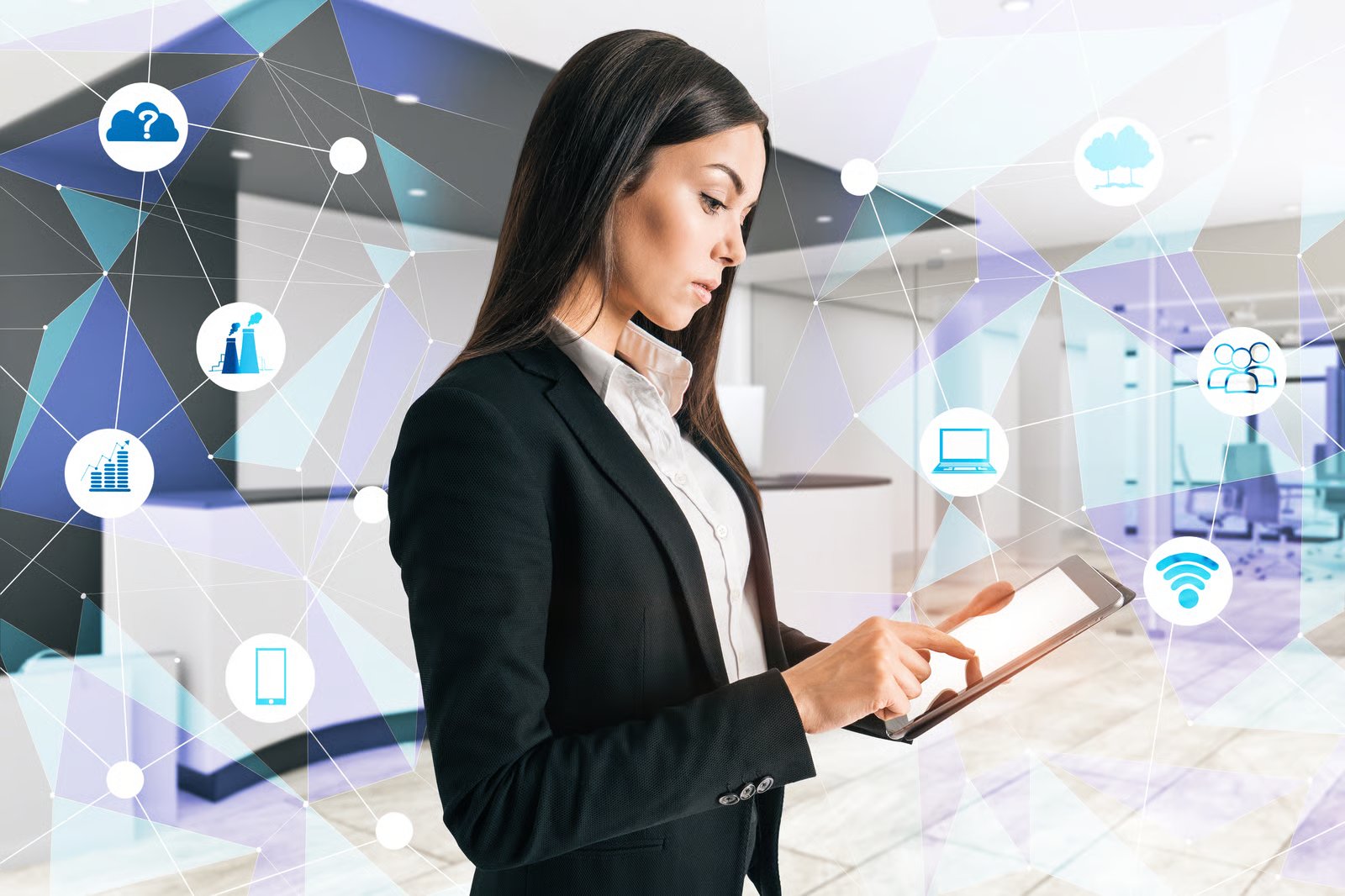
Facility manager using a tablet to manage connected smart office devices

Smart office discussions often focus on software features: booking, analytics, security, and automation. Yet those services depend on physical devices installed across the building. Hardware choices affect how people interact with the system, how equipment communicates, and how easily devices can be maintained.


Smart Panel PCs for Office Automation

Smart Panel PCs provide compact, dedicated touchscreen interfaces for modern workplaces. Compared with traditional industrial panel PCs, their space-saving designs and flexible mounting options make them well suited for meeting room signage, desk booking, and other office automation applications.


For example, Avalue's TD-1070 offers a 10.1-inch touchscreen for meeting room signage, while the compact 3.6-inch TD-0360 provides an interface for desk booking in shared workspaces. Both can support workplace automation when integrated with compatible management software.


Embedded Computing for Local Integration

Define the tasks that run locally, such as device communication, interface rendering, sensor processing, or offline operation, before selecting an embedded computer. Check CPU and memory capacity, operating-system support, Ethernet, serial and USB connections, storage, and thermal limits against those workloads.


In an architecture with centralized administration, on-site computers run local interfaces and equipment integrations while the central platform manages reporting and configuration. Specify synchronization, uptime monitoring, recovery behavior, and maintenance access for each node.


ARM or x86: Which Architecture Should You Choose?

ARM and x86 platforms can both support smart office applications. ARM-based systems may offer advantages in power consumption and compact integration, depending on the processor and system design. x86 platforms are often considered when compatibility with existing software and peripherals is a priority. Performance and power efficiency should be evaluated at the individual product level.


Neither architecture is automatically better. Compare exact models by benchmarking the application's response time, sustained performance, thermal behavior, update support, peripheral availability, and total cost.


Reliability, I/O, and Maintainability

A permanently installed panel needs different planning from a device employees can easily replace. Consider ventilation, operating temperature, touch durability, cleaning requirements, service access, and mounting. Check available LAN, USB, serial, and display interfaces against the integration plan.


For multi-site rollouts, standardize software images, security updates, replacement procedures, and spare-part planning. Confirm each shortlisted model's availability, product lifecycle, and support terms with the supplier.

How to Choose Smart Office Devices for Workplace Automation

To choose smart office devices, first define the workflow and installation location. Next, identify the software and building systems that must connect. Then select the required display, processor, interfaces, networking, and power. Finally, verify security, maintenance, and compatibility through a pilot before a larger deployment.


Step 1 — Define the Application

Start with a concrete requirement: show meeting room availability, register visitors, display facility status, or aggregate sensor data. Record who uses the device, how often, and what happens if it becomes unavailable. This keeps unnecessary features from driving the purchase.


Step 2 — Integrate Your Checklist

Create an integration checklist covering the existing scheduling platform, access-control system, network infrastructure, supported APIs, and required communication protocols. Verify compatibility using the exact hardware model and software version before deployment.


Step 3 — Select the Form Factor and Performance

Choose between a wall-mounted panel, kiosk-style interface, compact box computer, or gateway. Estimate application workload, display needs, memory, storage, peripheral connections, and installation constraints. Avoid an unnecessarily powerful processor for a simple status display, and avoid under-sizing a system that must handle several workloads.


Step 4 — Plan Security and Operations

Assess secure provisioning, user permissions, software patching, network segmentation, remote management, and physical access to the device. Review what happens after a power or network interruption. Security depends on the full solution and cannot be inferred from the computer hardware alone.


Step 5 — Validate Total Cost and Pilot Performance

Include installation, integration, licensing, management, maintenance, and replacement in total cost of ownership. Pilot the solution in representative conditions, such as a busy reception area, a high-use meeting room, or a remote equipment location. Verify touch usability, response times, connectivity, recovery, and support procedures before scaling.

How Avalue Supports Smart Office Hardware Integration

Avalue Technology offers hardware platforms for office automation, including Smart Panel PCs, control panels, and embedded computing systems. These products provide computing and interface options for applications such as room scheduling, visitor management, and facility monitoring, depending on the integrated software and peripherals.


For a room-booking project, define the screen size, mounting position, touch technology, power supply, network connection, and the booking software's operating-system requirements. For distributed monitoring, define field-protocol interfaces, processing workload, device count, installation environment, and recovery requirements before selecting an embedded computer.


Smart Office Applications with Avalue Smart Panel PCs

Meeting Room Signage – Avalue TD-1070


The Avalue TD-1070 features a 10.1-inch Full HD touchscreen, making it suitable for digital signage outside meeting rooms. Its Android-based platform, PoE+ support, and flexible glass, surface, or recessed mounting options simplify installation. When integrated with compatible room-booking software, it can display meeting schedules, room availability, and reservation information.


Desk Booking – Avalue TD-0360


The Avalue TD-0360 is a compact 3.6-inch smart panel designed for desk booking in shared and hybrid workspaces. Featuring a multi-touch display, dynamic status LEDs, Wi-Fi connectivity, and NFC/RFID options, it provides an intuitive interface for desk availability and reservation management when paired with compatible booking software. Its compact design and flexible mounting options make it easy to integrate into modern office environments.


Room-booking, visitor-management, and building-control functions come from application software and integrated third-party equipment. Specify each vendor's responsibility for sensors, readers, controllers, software, and support, and validate the complete configuration before rollout.


Explore Avalue's hardware portfolio for your integration requirements:


Compare shortlisted models by operating-system support, display and mounting needs, required I/O, power input, and expected product lifecycle. Confirm the final device and application configuration with the supplier or system integrator.

Frequently Asked Questions

What devices are commonly used in a smart office?

Common smart office devices include meeting room booking panels, visitor check-in kiosks, access control terminals, occupancy sensors, environmental sensors, and embedded computers. These devices work with management software and building systems to support workplace automation, space management, and daily operations.


How do you choose the right smart office devices for workplace automation?

Start by identifying the application, such as meeting room scheduling, visitor management, or facility monitoring. Then evaluate hardware requirements, including display size, processing performance, operating system compatibility, connectivity, and installation conditions. For larger deployments, test the complete solution before implementation.


What is the difference between an industrial panel PC and a standard tablet for smart office applications?

Industrial panel PCs are designed for dedicated installations and may offer mounting options, industrial I/O interfaces, and extended operating temperature support, depending on the model. Standard tablets are generally more portable but may require additional accessories for fixed installations. The best choice depends on the application, operating environment, and maintenance requirements.


Can industrial panel PCs integrate with existing room booking and building management systems?

Yes, industrial panel PCs can serve as touchscreen interfaces for existing room booking or building management systems when the required software, operating system, and communication interfaces are compatible. Functions such as scheduling, access control, and building automation depend on the integrated software and external controllers rather than the panel PC hardware alone.


Do smart office devices require a constant internet connection?

Not necessarily. Some smart office devices can perform selected local functions without an internet connection, depending on their software and system architecture. However, cloud-based scheduling, centralized monitoring, and remote management may require network connectivity. System integrators should verify offline functionality, data synchronization, and recovery procedures before deployment.


What should system integrators consider when selecting smart office hardware?

System integrators should evaluate software compatibility, processing requirements, connectivity, power input, mounting options, operating conditions, security, and product lifecycle. For embedded computers and industrial panel PCs, selecting the appropriate I/O interfaces and confirming compatibility with existing infrastructure are especially important for reliable long-term operation.

Conclusion

Whether you're developing a room-booking interface, visitor check-in kiosk, or facility management system, choosing the right hardware is essential for reliable integration. Explore Avalue's office automation and industrial computing solutions to find a platform that matches your application requirements.

Avalue Privacy Statement
INTRODUCTION

Welcome to avalue-usa.com ("we," "our," "us"). Your privacy is important to us. This Privacy Policy explains how we collect, use, disclose, and safeguard your information when you visit our website .

Privacy Policy Effective Date: Feb.13th, 2025

PAGE CONTENTS

A.Information We Collect

B.How We Use Your Information

C.Sharing Your Information

D.Cookies and Tracking Technologies

E.Data Security

F.Third-Party Links

G.Your Rights and Choices

H. Changes to This Privacy Policy

I. Contact Us

A. Information We Collect

We may collect the following types of information:
Personal Information: Name, email address, phone number, mailing address, and other contact details provided voluntarily.

Usage Data:
Information about how you interact with our website, such as IP address, browser type, pages visited, and duration of visit.

Cookies and Tracking Technologies:
We may use cookies and similar tracking technologies to enhance user experience and analyze website performance

B. How We Use Your Information

We use the collected information to:
1. Provide, operate, and maintain our website.
2. Improve user experience and website functionality.
3. Communicate with you, including responding to inquiries.
4. Analyze usage trends and monitor website performance.
5. Comply with legal obligations.

C. Sharing Your Information

We do not sell or rent your personal information. However, we may share your information with:
Service Providers: Third-party vendors that help us operate the website.
Legal Requirements: If required by law, we may disclose your information to comply with legal obligations.

D. Cookies and Tracking Technologies

We use cookies to improve website functionality and user experience. You can adjust cookie settings in your browser to disable or limit their use.

E. Data Security

We implement appropriate security measures to protect your personal information from unauthorized access, disclosure, or destruction.

F. Third-Party Links

Our website may contain links to third-party websites. We are not responsible for their privacy practices and encourage you to review their policies.

G. Your Rights and Choices

Depending on your jurisdiction, you may have rights regarding your personal data, such as access, correction, deletion, or opt-out of certain uses. Contact us to exercise these rights.

H. Changes to This Privacy Policy

We may change this Privacy Policy from time to time by posting a new version on this page. The new version will become effective on the date posted, which will be listed at the end of the page as the Last Updated.

I. Contact Us

If you have any questions about this Privacy Policy, please contact us at: support@avalue-usa.com

Subscribe Newsletter

Check the topics you're interested in, and be the first to receive the latest updates on them!

Subscribe Subject

Invalid format

Press Release

E-letter

White Paper

Enter Confirmation Code

Subscribe Successfully

Thank You for Subscribing, We look forward to staying in touch with you!

CLOSE

Unsubscribe

Check the topics you're interested in, and be the first to receive the latest updates on them!

Enter Confirmation Code

Unsubscribed

You have successfully unsubscribed from our emails. We always welcome you to resubscribe at any time.

CLOSE