What Is a Medical Grade Computer? Definition, Features, and Standards

Request a Quotation or Consultation

Select All

No products have been added to the consultation yet.

MORE PRODUCTS

What are you looking for?

Find the services you need by searching for product names, model numbers, or solution details.

Computers are now used throughout healthcare, from nursing stations and patient rooms to operating rooms, diagnostic imaging systems, medical carts, and telemedicine platforms. However, a standard office computer is not always suitable for these environments.


Healthcare computing systems may operate close to patients, connect with sensitive medical equipment, run continuously, and undergo frequent cleaning. These conditions introduce specific requirements related to electrical safety, electromagnetic compatibility, hygiene, reliability, and system integration.


A medical grade computer is designed with these challenges in mind. Depending on its intended use, it may also need to comply with recognized medical electrical equipment standards.

This article explains what defines a medical grade computer, the features and standards that matter, and how healthcare organizations and medical device manufacturers can select the right system for their applications.


What Is a Medical Grade Computer?

test

Doctor hand-pointing a medical-grade-computer

A medical grade computer is a computing platform designed for use in healthcare environments or as part of medical equipment. It may be supplied as a medical panel PC, tablet, embedded computer, workstation, display system, data gateway, or AI computing platform.


The term “medical grade” is not a single regulatory classification. Instead, it generally describes a computer engineered around the safety, performance, hygiene, and reliability requirements of a particular healthcare application.


Common characteristics include:

•Medical electrical safety and EMC compliance

•A sealed, easy-to-clean enclosure

•Fanless or low-maintenance thermal design

•Reliable operation over extended periods

•Connectivity for medical devices and hospital systems

•Longer product availability and controlled component revisions


How Medical Grade Computers Differ from Commercial Computers

Commercial computers are primarily designed for homes, offices, retail spaces, and general business environments. They may provide enough computing power for certain hospital tasks, but they are not necessarily evaluated for operation near patients, connection to medical equipment, regular exposure to disinfectants, or use around sensitive electronic systems.


A medical grade computer may use a medical-certified power supply, controlled leakage-current design, enhanced electromagnetic shielding, sealed controls, fanless cooling, and materials that tolerate frequent cleaning.


Manufacturers may also maintain the same platform for longer periods and provide stricter revision control than is typically available with consumer or office computers.


This does not mean every computer inside a hospital must be medical grade. A standard business PC may still be appropriate for administrative work in a non-clinical area. The need for a specialized system depends on where the computer is installed, what it connects to, and how it supports the healthcare workflow.


Why Healthcare Environments Require Specialized Computing Systems

Healthcare facilities contain numerous electronic systems operating close together. Patient monitors, wireless communication devices, medical imaging equipment, electrosurgical systems, motors, and power converters can generate or be affected by electromagnetic disturbances.


Computers in clinical areas are often shared by multiple healthcare professionals and used throughout long shifts. Because they operate in high-touch environments such as patient rooms, operating rooms, nursing stations, and examination rooms, their surfaces may be exposed to bacteria, viruses, bodily fluids, and chemical residues. They must therefore be easy to clean and durable enough to withstand frequent disinfection, while their components remain dependable and their interfaces support existing medical and hospital systems.


The U.S. Centers for Disease Control and Prevention highlight the importance of cleaning frequently touched surfaces and shared equipment in healthcare settings. Enclosure design and material compatibility are therefore practical infection-control considerations rather than purely cosmetic features. More information is available in the CDC’s infection-control guidance.


What Are the Key Requirements for a Medical Grade Computer?

test

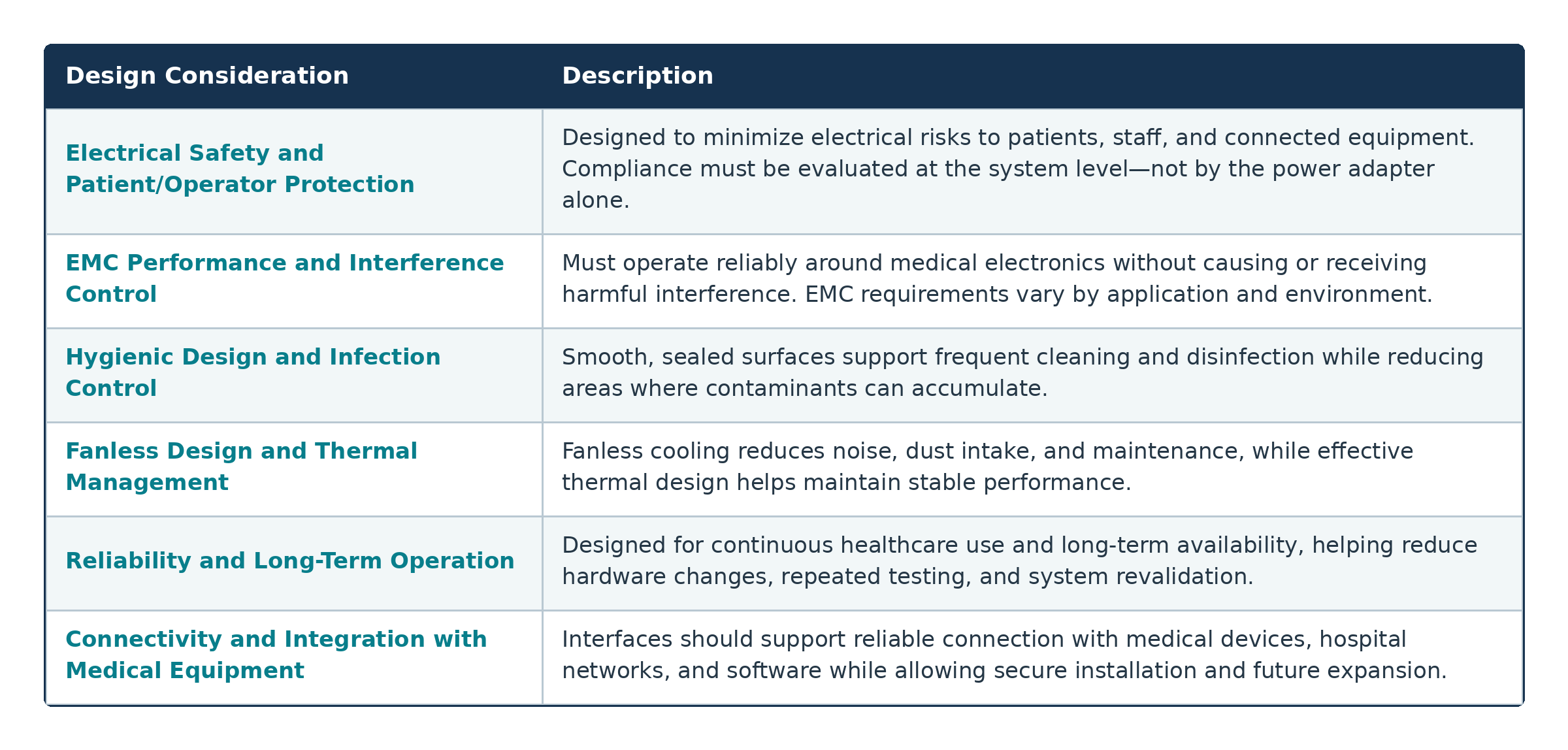
Electrical Safety Minimize electrical risks to patients, staff, and connected equipment. System-level compliance is essential. EMC Performance Ensure reliable operation without causing or receiving harmful electromagnetic interference. Hygienic Design

The requirements for a medical grade computer depend on its intended role. A bedside information terminal may have different safety, performance, and connectivity needs from a computer used for medical imaging or AI-assisted diagnosis.


Electrical Safety and Patient/Operator Protection

Electrical safety is one of the most important distinctions between medical and commercial computing systems.


When a computer operates close to a patient or connects to medical equipment, its design may need to limit leakage current, provide appropriate insulation, and maintain safe separation between internal circuits. These measures help reduce electrical risks to patients, healthcare professionals, and connected devices.


The complete system configuration must be considered. Using a medical-certified power adapter alone does not automatically make the finished computer or medical device compliant. Peripherals, cables, power supplies, displays, and connected equipment may all influence the final safety evaluation.


EMC Performance and Interference Control

Electromagnetic compatibility, or EMC, describes a system’s ability to operate correctly without producing excessive interference or being disrupted by nearby electronics.


This is especially important in healthcare environments because interference could affect patient monitoring, medical imaging, communications, or device control.


To improve EMC performance, a medical computer may incorporate:


•Electromagnetic shielding

•Proper grounding

•Filtered connectors

•Protected power inputs

•Carefully designed circuit layouts

•Tested cable and peripheral configurations


The required EMC performance depends on the equipment’s intended use and deployment environment.


Hygienic Design and Infection Control

Medical computers are often cleaned more frequently and with stronger chemicals than standard office equipment. Their enclosures should therefore reduce the number of seams, vents, exposed screws, and recessed areas where dust or contaminants may accumulate.


An edge-to-edge front surface, sealed touch controls, and an ingress-protected front panel can make routine wipe-down cleaning easier. Enclosure materials should also tolerate approved cleaning agents without becoming brittle, discolored, or damaged.


The manufacturer should clearly identify compatible cleaning methods and disinfectants so healthcare facilities can incorporate the computer into established infection-control procedures.


Fanless Design and Thermal Management

Many medical computers use fanless cooling because internal fans draw air and dust through the enclosure. Fans also create noise and introduce an additional mechanical component that may eventually require maintenance.


A fanless design does not eliminate the need for effective thermal management. Heat pipes, metal housings, heat spreaders, thermal pads, and energy-efficient processors may be used to transfer heat away from critical components.


The appropriate thermal architecture depends on the workload. A low-power nursing terminal may be cooled passively with relative ease, while an AI-enabled imaging system may require a more advanced design.


Reliability and Long-Term Operation

Healthcare workflows often depend on continuous access to patient information and connected systems. Unexpected downtime can interrupt clinical processes, delay documentation, and increase the workload of hospital IT teams.


Medical grade computers may use industrial components, solid-state storage, watchdog timers, secure power connectors, hardware monitoring, and remote management functions to improve reliability.

Long-term platform availability is equally important. Medical device manufacturers may need to maintain the same validated system for several years. Frequent changes to processors, motherboards, or other components can lead to additional testing, software verification, documentation, and regulatory review.


Connectivity and Integration with Medical Equipment

A medical computer may need to communicate with patient monitors, diagnostic equipment, scanners, medical cameras, RFID readers, barcode systems, displays, and hospital networks.


Typical connectivity options may include USB, Ethernet, serial ports, HDMI or DisplayPort, GPIO, Wi-Fi, Bluetooth, M.2, and PCI Express expansion. Some applications may also require isolated or lockable connections.


Port selection should not be based on quantity alone. Developers should consider interface location, bandwidth, electrical characteristics, cable routing, security, and compatibility with current and future equipment.



What Certifications and Standards Are Commonly Required for Medical Grade Computers?

test

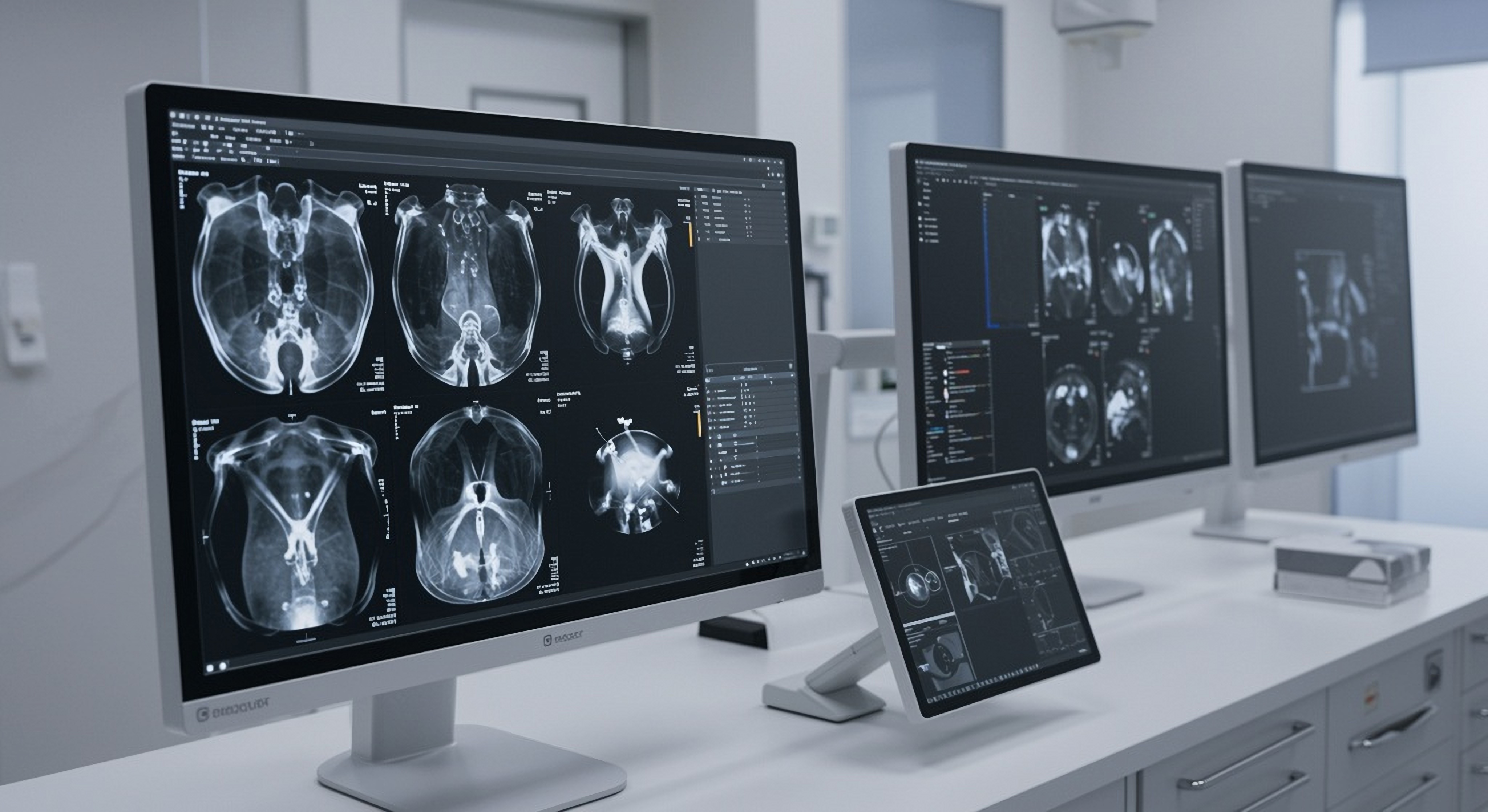
Medical grade monitors for medical uses

Certification requirements depend on the intended application, complete system configuration, target market, and regulatory pathway. A certificate should therefore be reviewed as part of a broader compliance strategy rather than treated as a universal guarantee.


IEC 60601-1: Medical Electrical Equipment Safety

IEC 60601-1 is one of the most widely recognized standards for medical electrical equipment. It establishes general requirements for basic safety and essential performance.


The standard addresses electrical hazards, insulation, leakage current, mechanical risks, excessive temperatures, fire protection, and other protective measures.


Choosing a computer that has already been evaluated against IEC 60601-1 can support medical system development. However, certification of the computer does not automatically certify the complete medical device into which it is integrated.


IEC 60601-1-2: Electromagnetic Compatibility

IEC 60601-1-2 is a collateral standard covering electromagnetic emissions and immunity for medical electrical equipment and systems.


It evaluates whether equipment can maintain basic safety and essential performance when exposed to electromagnetic disturbances while also limiting the interference it produces.


A medical computer may pass IEC 60601-1-2 testing as a standalone product, but the finished system may still require additional testing after cables, displays, wireless modules, peripherals, and medical devices are connected.


UL / EN 60601-1 and Regional Compliance Considerations

Different markets adopt IEC 60601-1 through regional or national versions. EN 60601-1 is commonly used in Europe, ANSI/AAMI ES60601-1 applies in the United States, and CAN/CSA-C22.2 No. 60601-1 is relevant in Canada.


Manufacturers should confirm the applicable edition, amendments, national differences, and transition deadlines for each target market.


The U.S. Food and Drug Administration also maintains a recognized consensus standards database, which medical device developers can consult when planning regulatory submissions.


IP Ratings and Other Application-Dependent Requirements

An IP rating describes how effectively an enclosure protects against contact, solid particles, dust, and water.


For example, a front IP65 rating may make a medical panel PC easier to clean and more resistant to splashes. However, a front-panel rating does not necessarily apply to the rear enclosure, connectors, or the entire computer.


Depending on the application, other relevant requirements may include:


•Battery safety

•Medical display performance

•Cybersecurity requirements

•Home healthcare standards

•Medical alarm requirements

•Environmental and transportation testing

•Application-specific IEC 60601-2 standards


Why Certification Requirements Vary by Medical Application and Deployment Environment


Not every computer used in a healthcare facility must comply with IEC 60601-1.


The applicable requirements depend on the computer’s intended purpose, patient proximity, system connections, role in diagnosis or treatment, installation environment, and target market.


For example, a computer used for appointment scheduling in an administrative office presents different risks from one installed beside a patient or integrated into a surgical imaging system.


Defining the intended use early helps manufacturers avoid selecting an unsuitable platform or pursuing certifications that do not match the final application.


Medical Grade Computer vs. Commercial Computer: What Are the Differences?

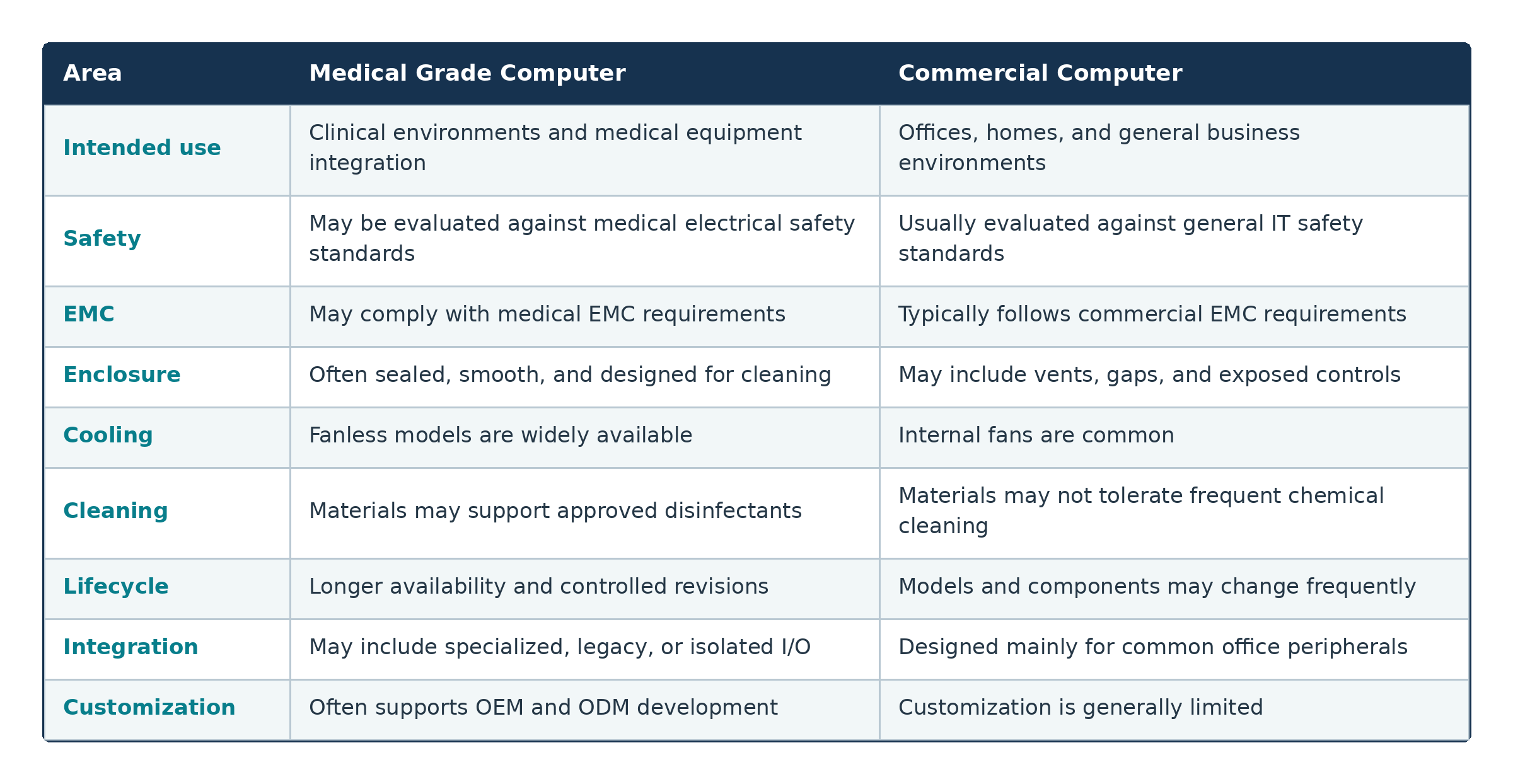
test


The primary difference is not simply that a medical computer is more durable. It is designed as part of a broader safety, compliance, integration, maintenance, and lifecycle strategy.


Common Applications of Medical Grade Computers

Medical grade computers are used across a wide range of clinical and healthcare environments.


Common applications include:

Hospital information systems and nursing stations: Accessing electronic medical records, medication information, laboratory results, schedules, and communication platforms.


• Medical carts and mobile workstations: Bringing documentation, patient data, and clinical applications closer to the point of care.


•Operating rooms: Supporting surgical imaging, video management, equipment control, documentation, and data integration.


•Diagnostic and medical imaging systems: Handling image acquisition, reconstruction, visualization, device control, and AI inference.


Patient monitoring: Collecting and displaying information from bedside devices and centralized monitoring platforms.


Telemedicine and point-of-care applications: Combining computing, video, audio, and secure connectivity for remote consultation and mobile clinical workflows.


The priorities vary by application. Nursing terminals may emphasize easy cleaning and reliable networking, while imaging systems may require stronger processing performance, larger memory capacity, faster storage, and additional expansion options.


How to Choose the Right Medical Grade Computer

The selection process should begin with the intended application rather than a processor model or screen size.


First, determine where the computer will be installed, how close it will be to the patient, what equipment it will connect to, and whether it supports diagnosis, treatment, monitoring, or administration.


•A practical evaluation should cover:

•Required medical safety and EMC certifications

•CPU, GPU, memory, storage, and AI performance

•Display size, brightness, resolution, and touch technology

•Required wired and wireless interfaces

•Mounting and cable-routing requirements

•Fanless operation and thermal performance

•Cleaning methods and disinfectant compatibility

•Product lifecycle and long-term technical support


For a medical panel PC, the display and touch interface can directly affect clinical usability. Glove operation, wet-touch support, viewing angle, screen brightness, and port placement should be reviewed according to the actual workflow.


Buyers should also confirm that certification documents match the exact system model, power supply, configuration, and standard edition under consideration.


Finally, ask the supplier how it manages component changes, firmware updates, repairs, end-of-life notifications, and product availability. These factors can have a major impact on the long-term cost of maintaining a regulated medical system.


Avalue Medical Grade Computing Solutions

Avalue provides healthcare computing products for hospitals, system integrators, and medical equipment manufacturers.


Its medical computing portfolio includes:

•Medical panel PCs

•Medical tablets

•Medical displays

•Medical AI computers and data gateways

•Medical cart and power solutions

•Video management systems

•Mounting and peripheral options


These platforms support applications such as bedside care, nursing stations, telemedicine, operating rooms, medical imaging, mobile workstations, and AI-assisted healthcare.


Selected Avalue medical computers are available with certifications such as IEC or EN 60601-1 and IEC or EN 60601-1-2. The exact certifications vary by model, configuration, and target region, so customers should confirm that the selected platform meets the requirements of their intended application.


Avalue also supports OEM and ODM development. Processing platforms, I/O layouts, display and touch interfaces, wireless connectivity, enclosure designs, expansion options, and certification strategies can be adapted to different project requirements.


This combination of standard medical computing products and customization capabilities helps medical device manufacturers address performance, integration, compliance, and lifecycle needs through a coordinated development process.


Frequently Asked Questions About Medical Grade Computers

What certifications are commonly required for medical grade computers?

IEC or EN 60601-1 is commonly associated with medical electrical safety, while IEC or EN 60601-1-2 addresses electromagnetic compatibility.


Regional versions and additional application-specific standards may also apply. The exact requirements depend on the intended use, complete system design, and target market.


Does Avalue offer IEC 60601-1 certified medical computers?

Yes. Selected Avalue medical computing products are available with IEC or EN 60601-1 and IEC or EN 60601-1-2 certification.


Because certification coverage differs among models and configurations, customers should verify the exact approvals before selecting a product.


What is the difference between a medical grade computer and a regular computer?

A medical grade computer is designed around healthcare-specific requirements such as electrical safety, EMC, infection control, reliability, equipment integration, and long-term product availability.


A regular computer is primarily designed for consumer or office use and may not be suitable for patient-care environments or integration into medical electrical equipment.


Are all medical computers required to comply with IEC 60601-1?

No. The requirements depend on the computer’s intended function, patient proximity, system connections, deployment environment, and regulatory classification.


A computer used for administrative work may have different requirements from one controlling a medical device or operating within the patient environment.


How do I choose a medical grade computer for my healthcare application?

Begin by defining the intended use, connected equipment, patient proximity, software workload, mounting arrangement, cleaning procedures, and target markets.


Then compare potential platforms based on certification, performance, thermal design, display quality, connectivity, lifecycle support, and customization capabilities.


Conclusion

A medical grade computer is more than a conventional PC placed inside a hospital. It is a purpose-built computing platform designed to address the safety, EMC, hygiene, reliability, connectivity, and lifecycle demands of healthcare environments.


The right solution depends on the application. A nursing terminal, medical cart computer, operating-room system, and diagnostic imaging platform may each require a different combination of performance, certifications, interfaces, and enclosure features.


Defining these requirements early can reduce integration risks, support compliance planning, and help create a more dependable healthcare system.


Looking for a medical grade computer that matches your application, certification, performance, and integration requirements? Contact Avalue to discuss your healthcare computing project and identify the right platform for your deployment.


Avalue Privacy Statement
INTRODUCTION

Welcome to avalue-usa.com ("we," "our," "us"). Your privacy is important to us. This Privacy Policy explains how we collect, use, disclose, and safeguard your information when you visit our website .

Privacy Policy Effective Date: Feb.13th, 2025

PAGE CONTENTS

A.Information We Collect

B.How We Use Your Information

C.Sharing Your Information

D.Cookies and Tracking Technologies

E.Data Security

F.Third-Party Links

G.Your Rights and Choices

H. Changes to This Privacy Policy

I. Contact Us

A. Information We Collect

We may collect the following types of information:
Personal Information: Name, email address, phone number, mailing address, and other contact details provided voluntarily.

Usage Data:
Information about how you interact with our website, such as IP address, browser type, pages visited, and duration of visit.

Cookies and Tracking Technologies:
We may use cookies and similar tracking technologies to enhance user experience and analyze website performance

B. How We Use Your Information

We use the collected information to:
1. Provide, operate, and maintain our website.
2. Improve user experience and website functionality.
3. Communicate with you, including responding to inquiries.
4. Analyze usage trends and monitor website performance.
5. Comply with legal obligations.

C. Sharing Your Information

We do not sell or rent your personal information. However, we may share your information with:
Service Providers: Third-party vendors that help us operate the website.
Legal Requirements: If required by law, we may disclose your information to comply with legal obligations.

D. Cookies and Tracking Technologies

We use cookies to improve website functionality and user experience. You can adjust cookie settings in your browser to disable or limit their use.

E. Data Security

We implement appropriate security measures to protect your personal information from unauthorized access, disclosure, or destruction.

F. Third-Party Links

Our website may contain links to third-party websites. We are not responsible for their privacy practices and encourage you to review their policies.

G. Your Rights and Choices

Depending on your jurisdiction, you may have rights regarding your personal data, such as access, correction, deletion, or opt-out of certain uses. Contact us to exercise these rights.

H. Changes to This Privacy Policy

We may change this Privacy Policy from time to time by posting a new version on this page. The new version will become effective on the date posted, which will be listed at the end of the page as the Last Updated.

I. Contact Us

If you have any questions about this Privacy Policy, please contact us at: support@avalue-usa.com

Subscribe Newsletter

Check the topics you're interested in, and be the first to receive the latest updates on them!

Subscribe Subject

Invalid format

Press Release

E-letter

White Paper

Enter Confirmation Code

Subscribe Successfully

Thank You for Subscribing, We look forward to staying in touch with you!

CLOSE

Unsubscribe

Check the topics you're interested in, and be the first to receive the latest updates on them!

Enter Confirmation Code

Unsubscribed

You have successfully unsubscribed from our emails. We always welcome you to resubscribe at any time.

CLOSE